As advisers renew their focus on cybersecurity, one important area not to overlook are passwords. While choosing the right technology is an important component of reinforcing our security when online, so is correcting some of our bad habits.
Passwords have been broken for some time, though they remain a necessary element of securing the systems we use. There are two primary reasons passwords, by themselves, are not optimal as a security gatekeeper.
(Related read: Morgan Stanley breach offers universal cybersecurity lessons)
One is the availability of very powerful, inexpensive computers. These enable bad actors to perform what are called brute force attacks on systems. In the most basic terms, this is where a hacker seeks to guess passwords and 'guess' a login. Once this is done, the hacker can freely navigate a system using one or more accounts.
The second is our sin of convenience. For example, if you use one or two passwords for multiple online accounts, and those are compromised, you are not only risk one account, but many. Likewise, the simpler the password, the quicker they are to be 'guessed.'
Password managers seek to disrupt this using a couple of different features. Let's start with how they work and how they can help us overcome the challenges of using difficult and unique passwords.
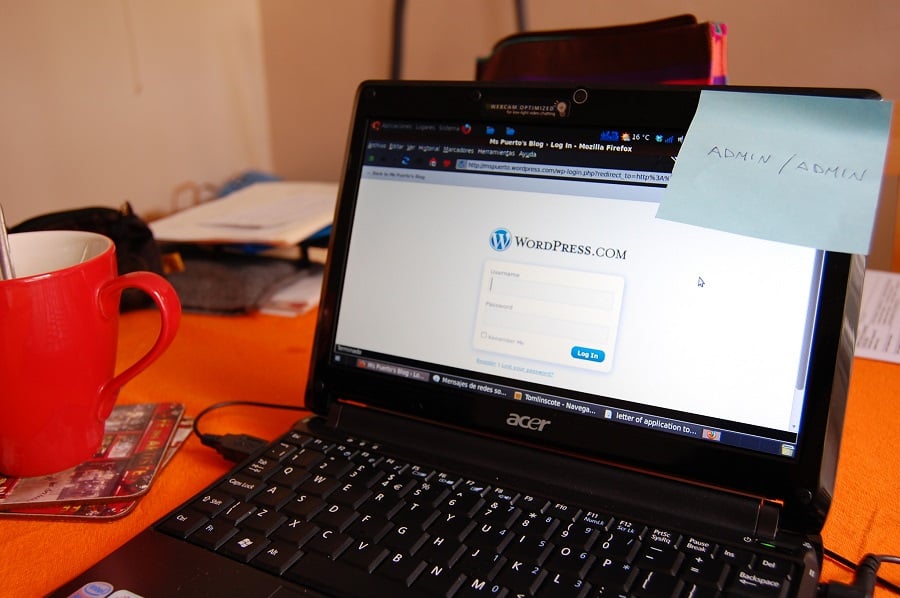
The most popular solutions work across any web browser on a PC or Mac, and extend onto smartphones and tablets. Once installed, they ask you to create one primary password to unlock access to all of your passwords. This is the only password you will need to remember, and writing it on a sticky note or keeping it somewhere easy to find does not qualify as 'remembering it.'
Initially, a password manager should prompt you to import passwords already stored within a browser, such as Google Chrome, Internet Explorer or Mozilla's Firefox. Once these are imported, they can be removed from the browser's storage, since they were not being stored securely.*(More: Why insurance is not the cybersecurity answer)
As you visit and use sites and tools online that requires your login, the password manager will prompt you to save your credentials. Use this also as an opportunity to change your passwords at each destination. Your password manager will allow you to create unique, complex passwords and save those for easy use later. Password managers support automatically including numbers, uppercase letters as well as special characters, so you can end up with a password like “U6%$1bzdg)i!” and not have to remember how to type it in.
If you have a large number of online accounts to store credentials for, you can also run a test against your existing passwords. A password manager can often help you determine if your passwords are too weak, if you have duplicates across sites, and more.
Choosing a tool that supports many platforms and devices means these new, complex passwords will also be available to you in and out of the office and on any device you use. This continues to provide secure convenience wherever you are.
These three password managers noted below also offer business-tier services if you want to extend this to your staff. This will enable you to maintain control of the online credentials used in the course of running your business while also insuring your employees are more secure in their overall use of passwords.
1Password by Agile Bits. 1Password started out as a pure Mac solution for passwords. It has since matured into an excellent option for both Windows and Mac users - with apps that extend onto Android and iOS devices. 1Password enables the use of multiple personal and professional vaults.
LastPass. Maybe the most flexible manager with coverage that also includes Windows Mobile, USB-only editions for thumb drives, as well as Blackberry and Surface RT. The enterprise edition of LastPass (their business tool offering) also includes support for single sign on to important business platforms for employees - like Office 365, Salesforce and Box.net, as well as an auditing dashboard to control business logins for employees.
RoboForm. This was for a long time a Windows-only selection. However, that changed and now includes support for multiple web browsers and mobile devices. There is also an offline edition of RoboForm called RoboForm2Go. This will store all of your passwords on a secured thumb drive with no cloud sync. The drive can then be plugged into any computer with a USB port to unlock and access your passwords without leaving those passwords on the computer in use.
While we are only scratching the surface of reasons to use password managers, and their capabilities, the results are clear. Strong passwords alone will not completely remove the risk to our online accounts, but it greatly reduces the ability for bad actors to easily break in. Extending those difficult passwords to our mobile devices while preserving the ease of logging in should be the feature that makes it a no-brainer for most to take the leap.
Blane Warrene is the co-founder of QuonWarrene.*Apple's Safari may be an exception. In the latest release of OS X, Apple's Keychain tool was extended to Safari and iCloud as a sort of encrypted password manager. While there are some elements of a password manager in this solution, it does not yet have the robustness of a pure password management app. However, if you work purely on OS X and iOS devices, it may serve as a solution that is a step up from no password management at all.(More from Blane Warrene: The biggest mistakes advisers make with technology)
A state-by-state Medicaid report card, federal cuts starting in January and a home-equity cap due in 2028 are pushing a program most affluent families ignore into the planning conversation.
"I know the number that I want to be able to retire on, and now I just want out," says Wilmington Trust's Marguerite Weese, describing a common refrain among business-owner clients.
As AI makes financial information more accessible than ever, Lana Hock explains why human judgment, trust, and empathy remain the qualities clients value most in a financial advisor